
Case study 02
Fennec: one system running the room, the door and the bar. Live
The flagship. A full operating system for premium nightlife and event venues, in production tonight at Harbour Event Centre, TradeX, The Pit UBC and The Show Ottawa, with more than 20 event companies publishing events on it.
What Fennec is
A venue does not need five tools. It needs one record of the night.
Fennec is an operating system, not a feature. It runs the floor, the door, the bar, the bottles, the coat check, the guest record, the campaigns and the count in the stock room, off one set of records that every surface reads at the same time.
"Floor plans, reservations, packages and live ops - synced with Square."
Fennec product copy, fennecapp.com
What a disconnected stack looks like on a Saturday
A venue running separate tools is running separate versions of the same night. Each one is right about its own slice and wrong about everything else, and the reconciliation happens in a group chat at 11pm.
-
01
The floor plan is a drawing
It lives in a design file or on paper, so it cannot tell anyone which table is still free.
-
02
Tickets sell somewhere else
A third-party page that knows the guest bought, and nothing about where they will sit.
-
03
The guestlist is a spreadsheet, or a text thread
Promoters add names in one place, the door reads another, and both are stale by midnight.
-
04
The bar runs on a POS that has never heard of the table
Tabs, voids and bottle service sit in the till, disconnected from the reservation that generated them.
-
05
Marketing is a separate address book
The people who came last Friday are in the POS. The people being emailed are in a mailing tool. They are not the same list.
Fennec collapses those five into one. The event, the table, the tab and the guest are single records. That is also what makes the intelligence layer possible: an agent cannot tell you what is leaking if the numbers are sitting in five accounts that never speak.
The network
Four named venues. More than twenty event companies.
Every venue on this list runs its own nights, its own promoters and its own bar. They share one system, which is why an event published in one room shows up in a feed that guests of the others already use.
Fennec is also where our own architecture came from. Vishal built the core of it and the Ferry agent network, and that is the same pair of hands now on the Uniserve build.
- Named venues
- Harbour Event Centre, TradeX, The Pit UBC, The Show Ottawa.
- Also on the network
- More than 20 event companies publishing events on it.
- Status
- Live. In production and used by paying operators right now.
Live venues running on Fennec tonight, plus 20+ event companies publishing events on the network.




The centrepiece
The guest picks the table, over a photograph of the real room.
This is the surface that changed the most for venues, and the one operators show their promoters first. A guest opens the event, sees the actual floor, and puts their party on a specific table. Nobody has to describe where table four is.
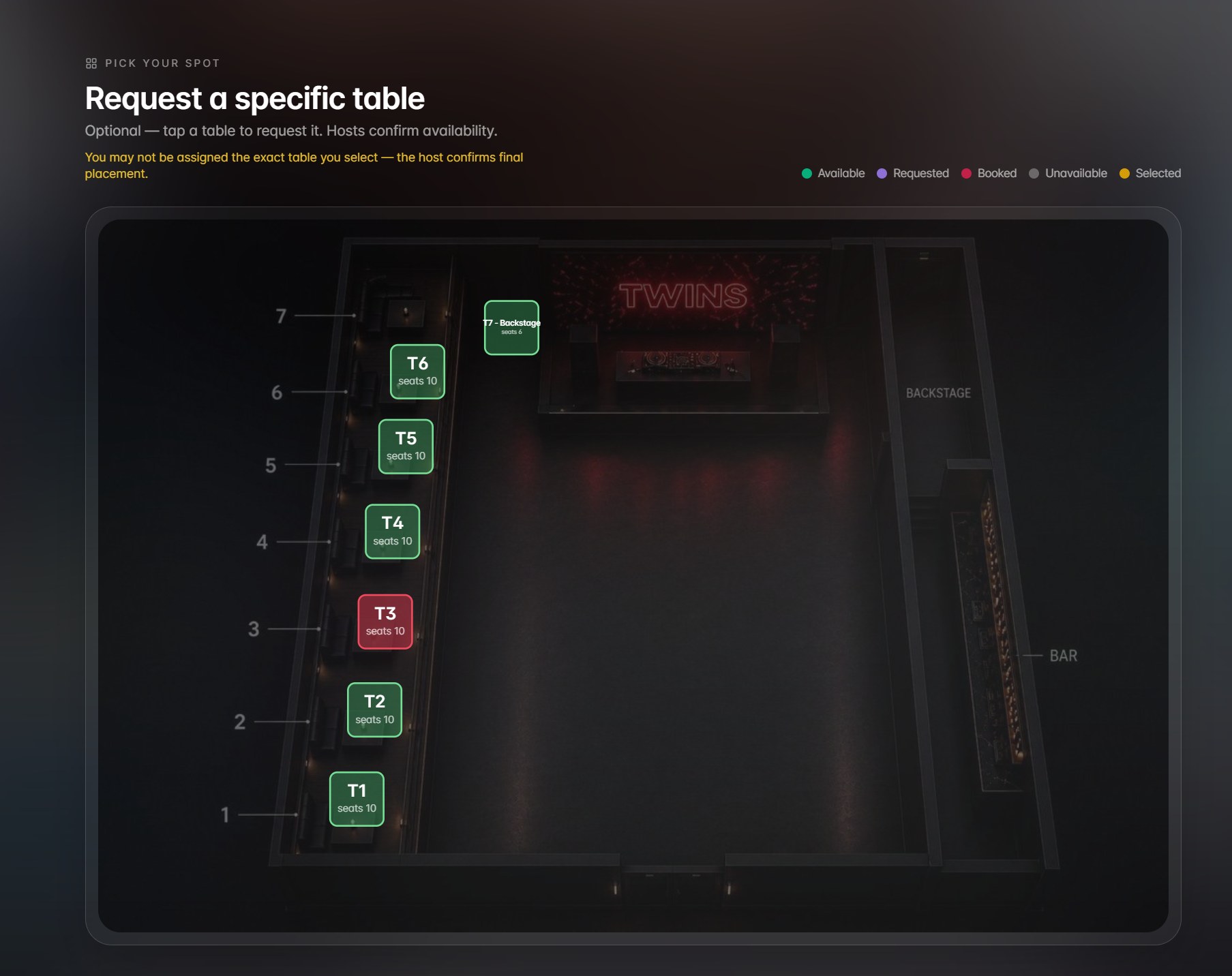
What is actually on the screen
Seat counts sit on each table. The bar is marked. So is the backstage table. A legend says what is available, what has been requested, what is booked, what is unavailable and what the guest has currently selected. Because the map is a photograph of the room rather than an abstract grid, a guest can tell the difference between the table beside the bar and the table beside the stage before they pay for either.
The host confirms final placement on the same map
A guest request is a request, not a booking. The host works the same map and confirms where the party actually lands, which is how a venue keeps control of its best tables without making a guest guess at a seating chart. Both sides are looking at one picture, so there is nothing to translate between them.
The value: availability stops living in text messages
That is the whole point. Availability used to live in a thread between a promoter, a host and an owner, and every one of them held a slightly different version of it. Now it lives in one place that every side reads at the same time. Nobody sells the same table twice. Nobody has to phone the office to ask whether T3 is gone.
The same record carries forward. The table the guest picked is the table the bar sees when the bottle order lands on it, and the table the analytics read when the night is counted.
The operator side
Somebody has to build the room first.
The floor plan editor is the operator half of the map the guest sees. Tables are placed on a canvas, and each one opens its own inspector.
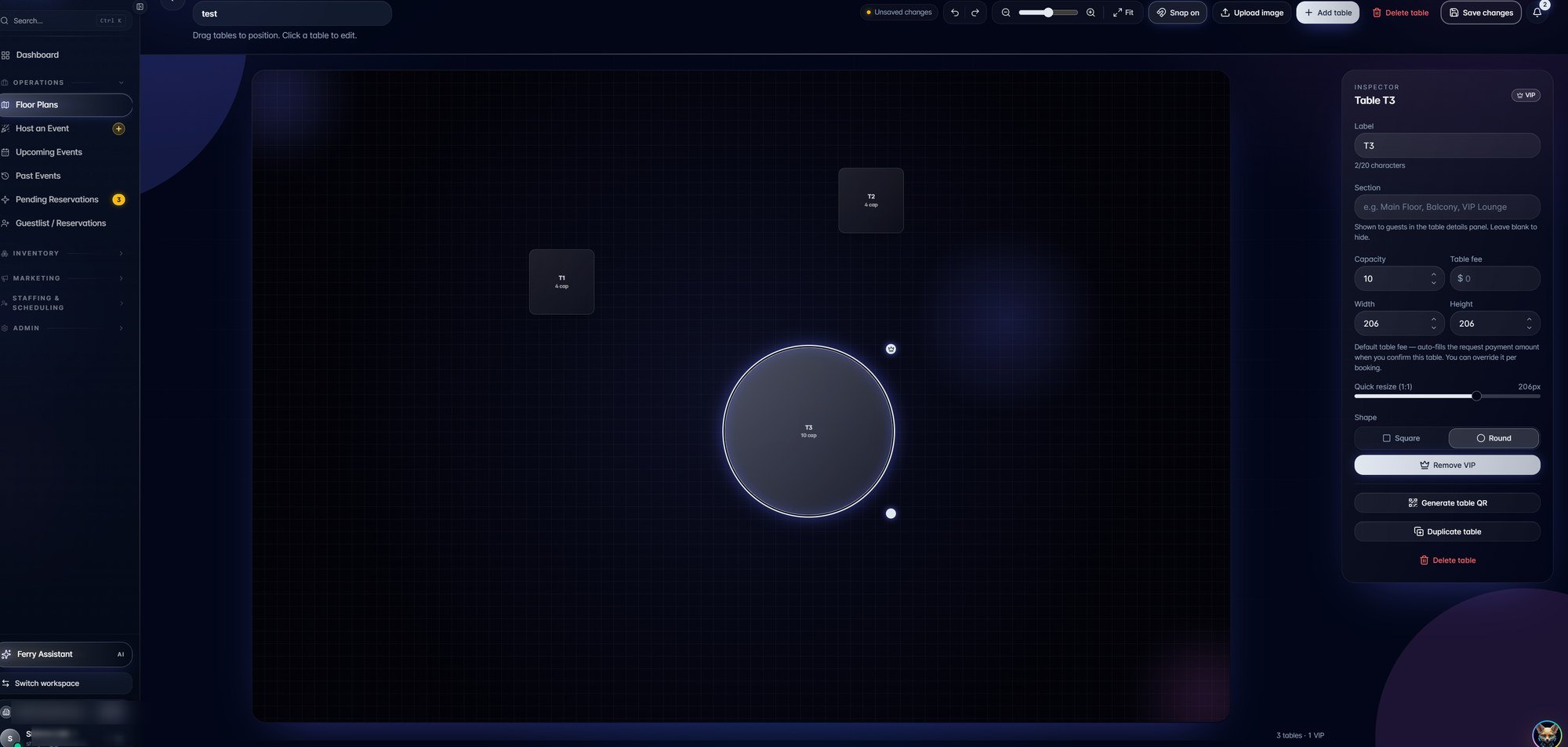
What the per-table inspector holds
Selecting a table opens a panel for that table alone: its label, its section, its capacity, its table fee, its size, whether it is square or round, a VIP flag, and an action that generates a QR code for it. A table is therefore a priced, addressable object rather than a shape on a picture.
Layouts are versioned, so a Friday room and a Saturday room are two saved states rather than one argument. Activating a layout is what publishes the map the guest picks from, which is why the two screens can never disagree.
"Design, version, and activate floor layouts in seconds."
Fennec product copy, fennecapp.com
The guest side
One page to book from, one feed to be found in.
The public event page is generated from the event the operator built, so the details on it cannot drift from the details in the system. The discover feed is the network layer that puts that page in front of guests who came for a different room.
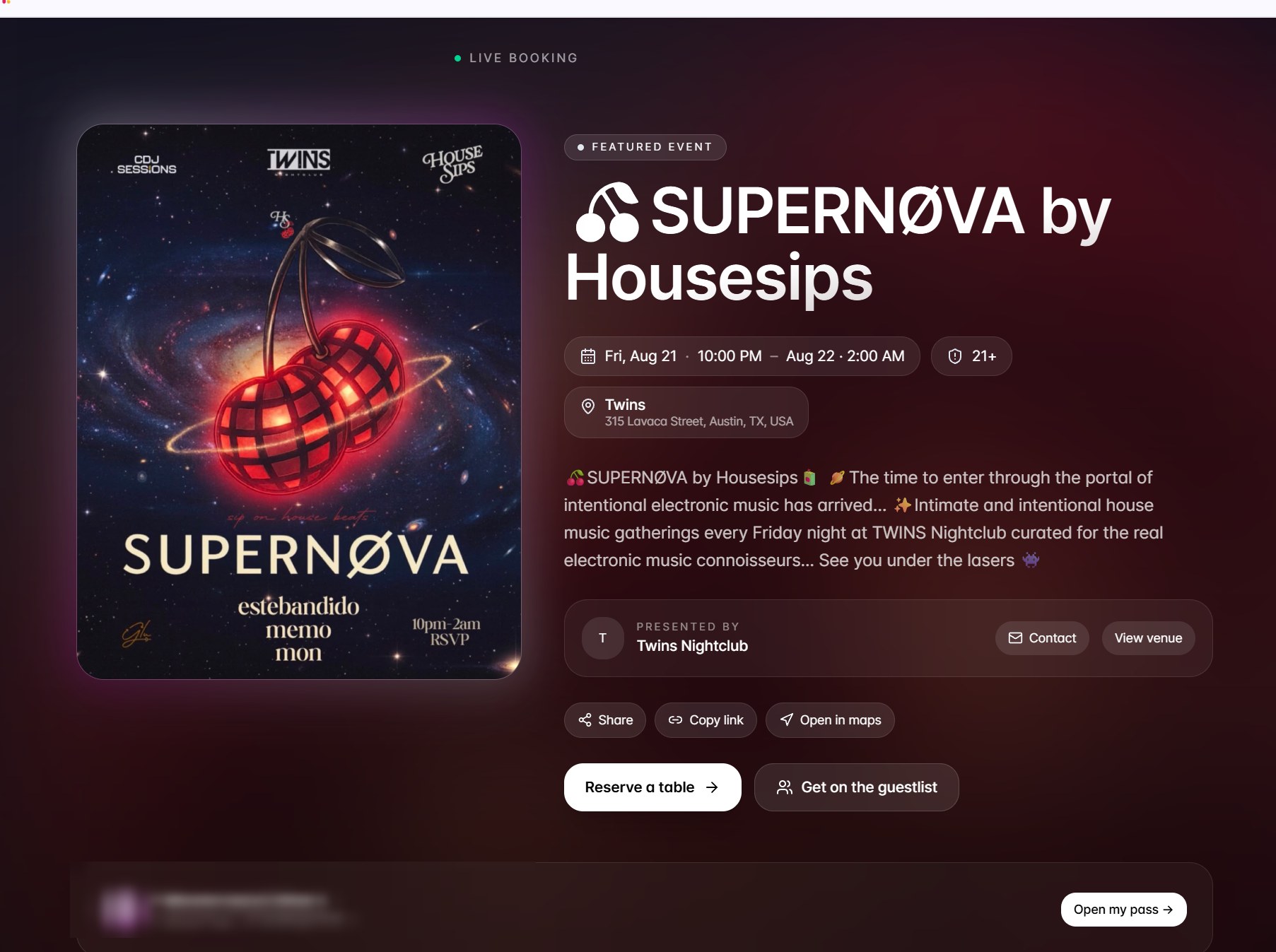
What a guest lands on
Date, age limit, venue address, presenter, share actions, and two ways in: reserve a table or get on the guestlist. Reserving a table is what opens the map in FIG. 02, so the booking journey never leaves the venue's own page.
"Sell tickets, import guestlists, and check guests in with a scanner."
Fennec product copy, fennecapp.com
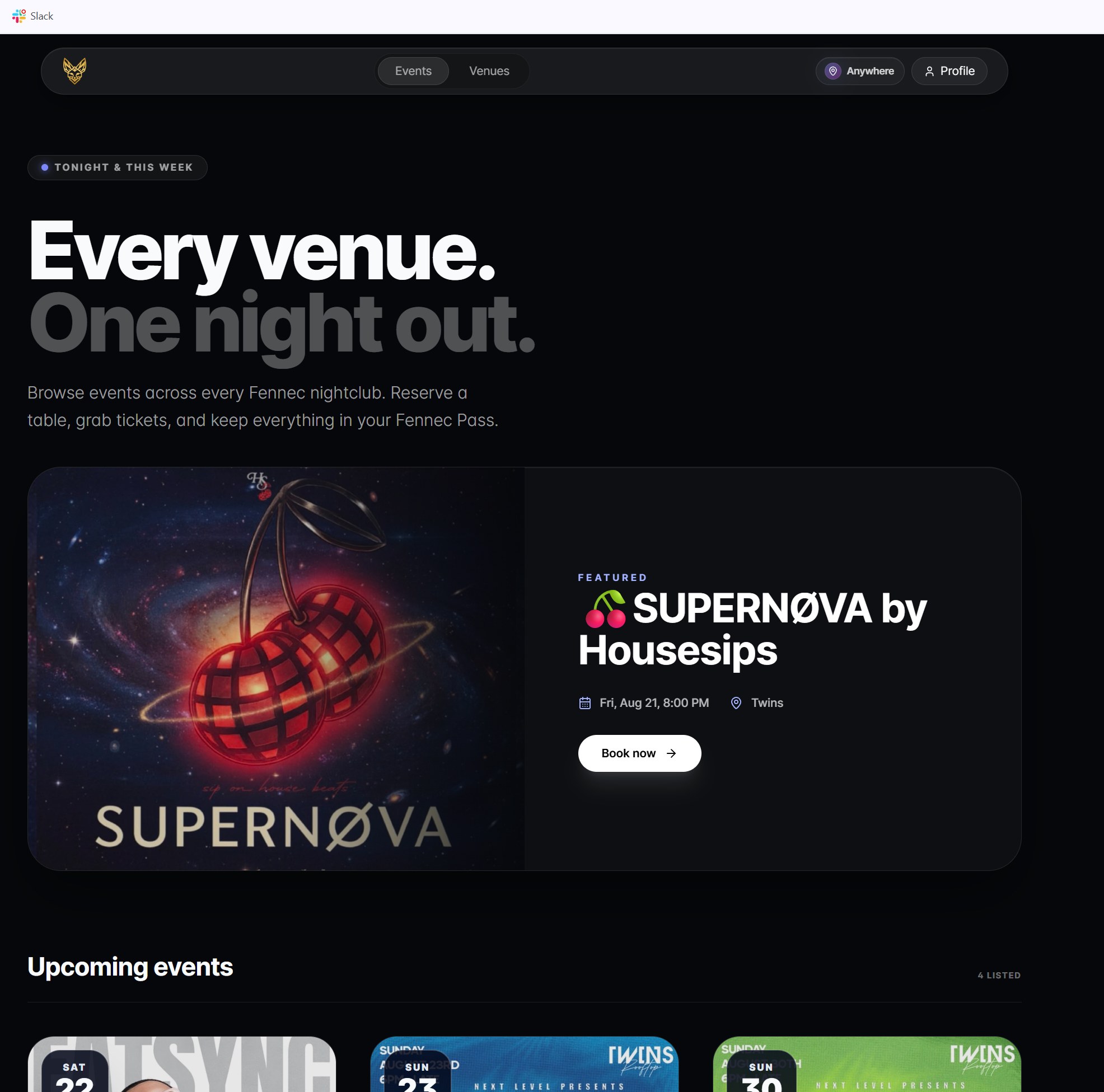
Why the network matters to a single room
Every event across every Fennec venue lands in one guest-facing feed, with a featured event at the top and an upcoming grid beneath it. A venue joining the network inherits an audience that is already there for the venue down the street.
"A guest-facing feed of every event across the Fennec network."
Fennec product copy, fennecapp.com
The intelligence layer
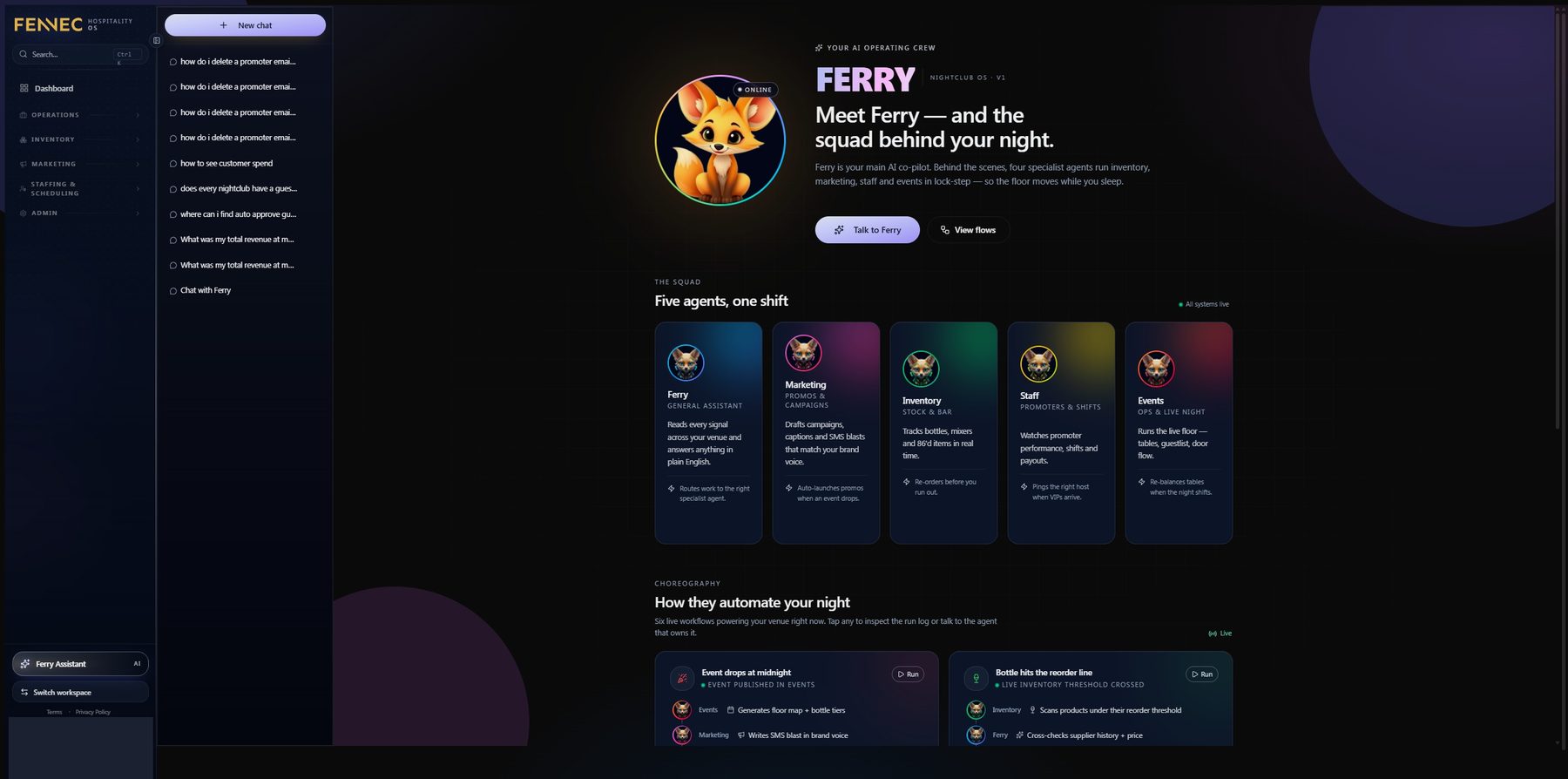
Ferry AI is a roster, not a chat box.
Underneath the surfaces sits Ferry AI, a coordinated agent network across ops, guests, campaigns, inventory and service. The roster covers Sales Analytics, Event Management, Table and Bottle, Guestlist and Reservations, and Promos and Insights.
One general assistant over a venue's data is a search box. A roster with an owner per surface can be tested, corrected and trusted per surface, which is why an operator asking about last Saturday's tables gets the answer from the agent that holds the tables.
The Revenue Copilot reads the four places where money leaks
A Revenue Copilot analyses voids, pricing, promoters and inventory, and reports what is leaking. It can only do that because the floor, the door, the bar and the stock room are writing into the same records rather than four accounts nobody reconciles.
- Voids
- What was rung in and then taken off, and by whom.
- Pricing
- What a table, a package or a bottle actually cleared against what it was listed at.
- Promoters
- Which names on the door turned into tabs, and which did not.
- Inventory
- What left the stock room against what was sold.
Inside one venue
Harbour Event Centre runs the inventory module, and it ties every ounce to a person.
This is the part of Fennec that took the longest to get right, because it is the part that has to be exactly correct or it is worse than nothing. A variance report that blames the wrong bartender costs you the bartender.
Every terminal maps to the person working it
Sales are not attributed to the bar, they are attributed to whoever was on that till. So the question stops being "why is liquor cost high this month" and becomes "who sold what, on which terminal, on which night". That mapping is the foundation everything else sits on, and it is set up once per venue.
Every drink is a recipe made of inventory items
A vodka soda is one ounce of vodka plus a measured pour of soda, and those two are stock items in their own right. Multiply the night's POS sales by the recipes and you have the theoretical usage: exactly how much liquid should have left the bottles if every pour was to spec.
The actual number comes off a scale, over Bluetooth
At close, the open bottles get weighed. We built the weigh-in flow to be fast and connected the scales over Bluetooth, because a count that takes an hour with a clipboard gets skipped and a count that takes minutes gets done. Bottle weight without the cap, against the liquid the POS says was poured.
Theoretical minus actual is the number that matters
The gap is the variance, in millilitres and in dollars, and because the terminals map to people it resolves to an individual rather than to the building. That is worth having for tax reporting, but the reason an owner keeps using it is staffing: the same data feeds the scheduling module, so a roster can be built around who actually sells and who actually pours to spec.
Every step above is a person confirming a number, not a system deciding one. The scale reports, the report flags, and a manager reads it in the morning.

The full breakdown
Five pages carry the rest of the system.
This page shows the surfaces that matter most to an owner deciding whether one system beats five. The module-by-module breakdown sits on five pages underneath this one, one area per page, so nothing has to be crammed in here.
-
01
Floor Plans, Live Ops, Table Management, Host Events, Bottle Service, Coat Check. Where FIG. 02 and FIG. 03 belong.
-
02
Ticketing, Promoter Portal, Guest CRM, Guest Management, Loyalty, Fennec Pass, Discover Events, Live Ordering.
-
03
Two-way POS sync with Square, Toast and Lightspeed, plus Bar Management across every bar.
-
04-05
Inventory Dashboard, Live Menu, Stock Room, In-Bar Inventory, Revenue Loss Calculator, and Staff Management: schedules, clock-in, role permissions and tip distribution.
-
06-07
Social, Event Poster, Drink Campaigns, the campaign composer and the email designer, then Analytics, Automations and Ferry AI on top.
- Events and floor
- Floor Plans, Live Ops, Table Management, Host Events, Bottle Service, Coat Check.
- Ticketing and guests
- Ticketing, Promoter Portal, Guest CRM, Guest Management, Loyalty, Fennec Pass, Discover Events, Live Ordering.
- POS and payments
- POS Integration with Square, Toast and Lightspeed, plus Bar Management across every bar.
- Inventory
- Inventory Dashboard, Live Menu, Stock Room, In-Bar Inventory, Revenue Loss Calculator.
- Staff
- Staff Management: schedules, clock-in, role permissions and tip distribution.
- Media and marketing
- Social, Event Poster, Drink Campaigns, plus a campaign composer and a drag-and-drop email designer.
- Analytics
- Analytics on revenue, attendance, table turnover and promoter performance, and Automations that trigger SMS, WhatsApp and email from any signal.
What happens next
If your operation runs on five tools, start with the audit.
Fennec is the largest thing we have built, and it started the same way every engagement does: we mapped where time and money leaked, then showed the arithmetic. You keep the map whether or not you hire us. If we do build, we agree the baseline in writing first, the clock starts at deployment, and you own the code.
The bar and the timeframe are agreed per engagement. Nothing here guarantees a particular dollar amount.
- Who you talk to
- Shiv and Vishal. No account managers, no slide decks.
- Direct
- shiv@exdsconsulting.com
- Read next
- Industries, then About.