
Fennec module 01
Events and floor ops: the room, as software.
A venue that cannot see its own room sells the same table twice. Six modules inside Fennec keep one layout true from the moment a host activates it to the moment the last tab closes. This is the family we get asked about first, because the double-booked table is the argument every owner has already had.
What is in this family
Six modules, one layout.
The numbered rows quote fennecapp.com word for word, in quotation marks. Every one of them reads and writes to the same floor plan, which is the whole point: the room is stored once and everything else asks it questions.
-
01
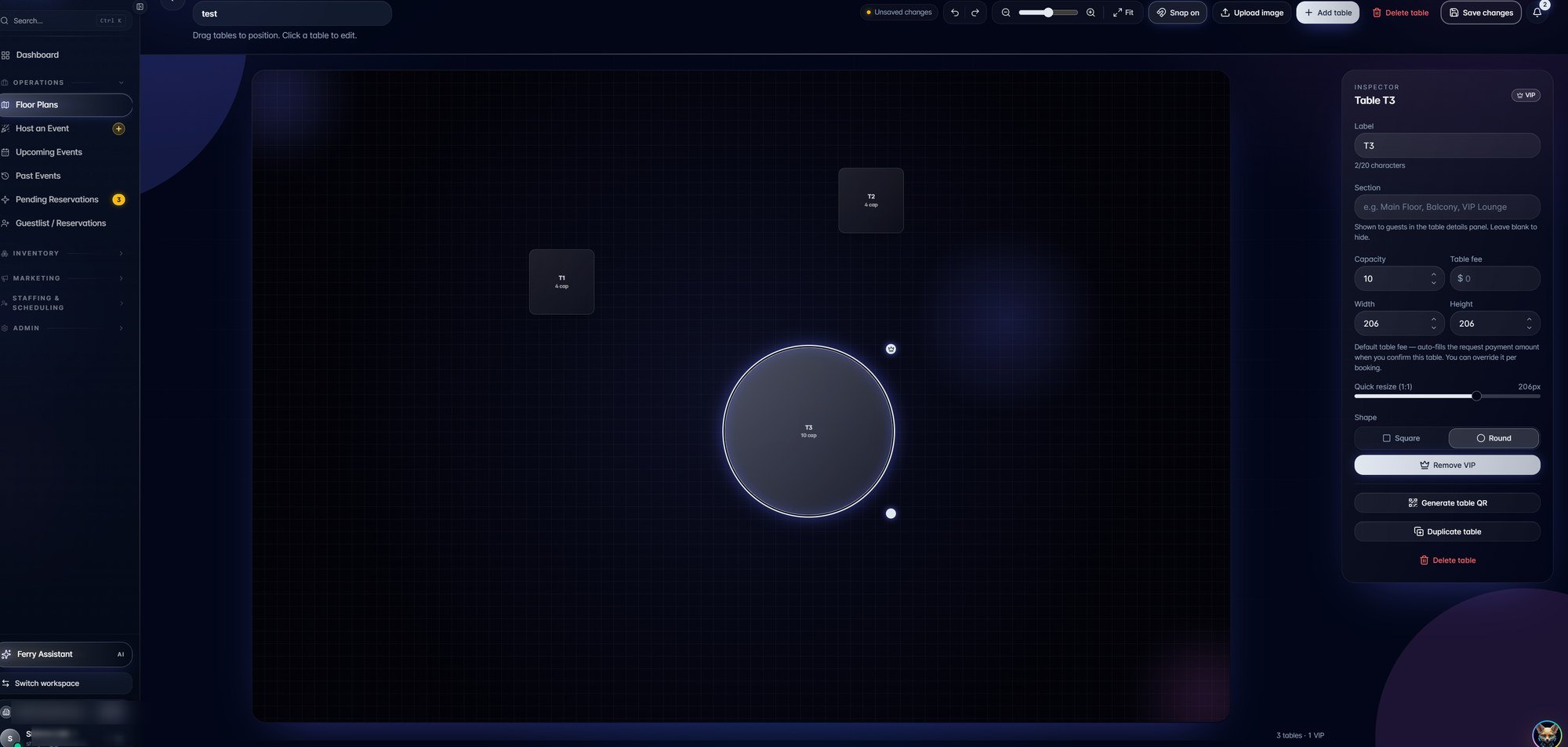
Floor Plans
"Design, version, and activate floor layouts in seconds."
-
02
Live Ops
"Guestlist management, real-time table statuses, and seat assignments."
-
03
Table Management
"Live table grid with minimum spends, server assignments and turn-time tracking."
-
04
Host Events
"Build the event, assign hosts, set hold strategies."
-
05
Bottle Service
"Tailored packages, automated bottle-girl flow, and complete order history."
-
06
Coat Check
"Digital coat check with QR receipts, photo capture and per-guest claim history."
The interface
The same room, from both sides.
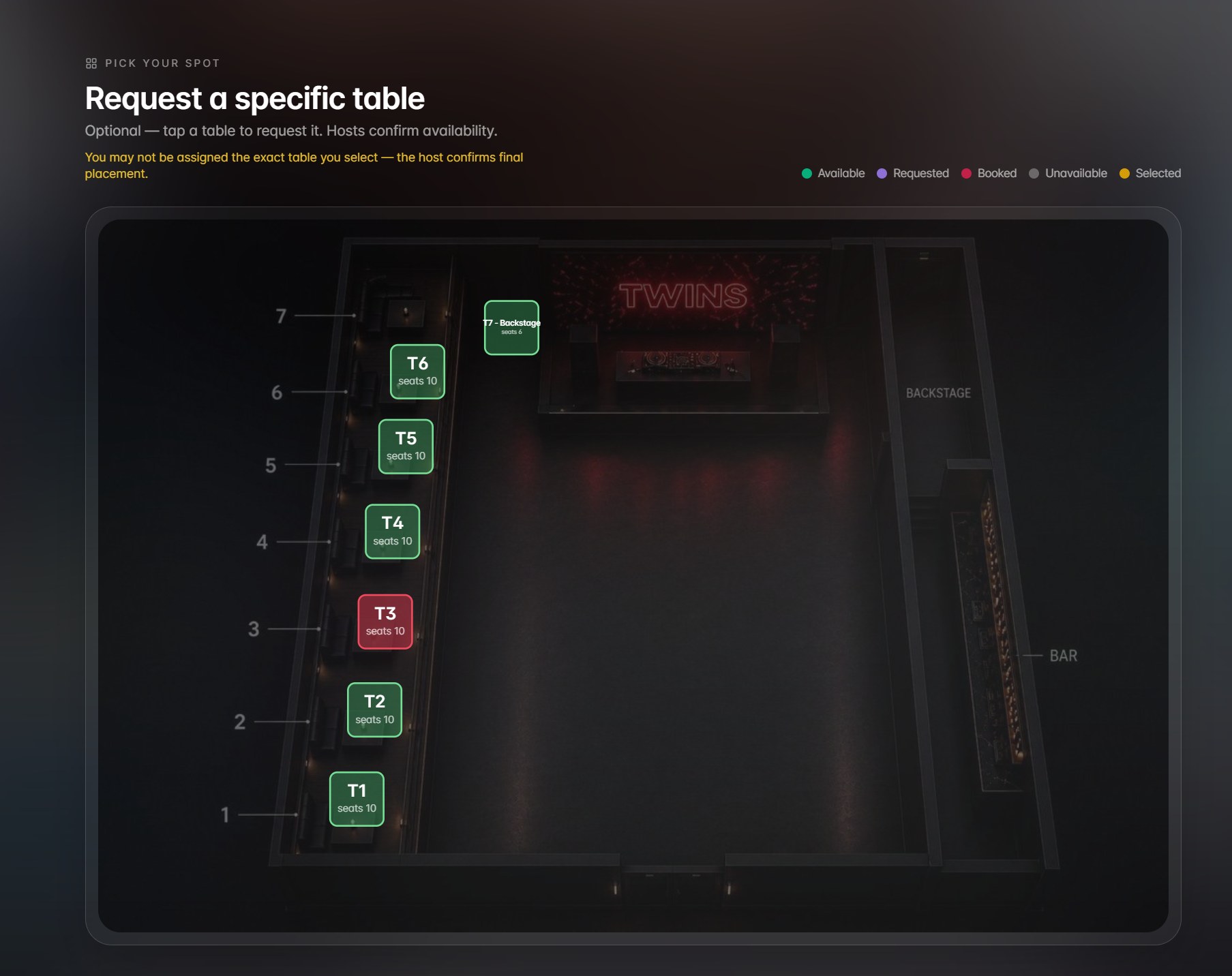
Two real captures from the live product. Guest names, contact details and pass IDs are blurred at source. The operator draws the room once; the guest books against that exact drawing, so there is only ever one version of the truth to argue about.
Why this family exists
None of this was drawn on a whiteboard first.
A host was double-booking tables over text message, so the room became software. Holds were being promised verbally and forgotten, so hold strategies became a setting on the event. Bottle orders lived in a server's head until the tab closed, so packages and order history became a record. Every module in this family is a record of an argument that had to stop.
That is also why the operator view and the guest view are the same object. Two views of one floor plan cannot disagree. Two spreadsheets and a group chat always will.
"Floor plans, reservations, packages and live ops - synced with Square."
Fennec product copy, fennecapp.com
Order of use
How the six get used on one night.
The modules are listed above in Fennec's own order. This is the order a venue actually touches them, from the afternoon build to the last coat off the rail.
-
1
Build the event and activate the plan
AfternoonHost Events builds the event, assigns hosts and sets the hold strategy. Floor Plans activates the layout that night will run on, drawn from a saved version rather than from scratch.
-
2
Guests pick their own tables
Before doorsThe guest-facing selection in FIG. 02 runs off the activated plan. A booked table reads as booked, a requested one reads as requested, and the host confirms instead of arbitrating.
-
3
Doors, guestlist and seat assignments
DoorsLive Ops carries the guestlist, real-time table statuses and seat assignments, so the door and the floor are reading one screen rather than comparing two.
-
4
Run the grid and the bottle flow
PeakTable Management holds the live grid with minimum spends, server assignments and turn-time tracking. Bottle Service runs the packages and the bottle-girl flow, and every order lands in the history rather than in someone's memory.
-
5
Close out and hand the coats back
CloseCoat Check returns items against QR receipts, photo capture and per-guest claim history. Sales sit against tables in Square, and the night's layout stays saved as a version for the next one.
Start here
A floor plan is a booking grid. Yours might not be a nightclub.
This family is shaped like a venue because that is the room it was built in. Underneath, it is a versioned layout, a live status per unit, a hold policy and an order history. That shape fits any business that assigns space or time to a paying customer and then has to defend the assignment.
The first step is the same either way: a free operations audit. We agree the bar in writing before anything is built, the clock starts at deployment rather than signature, and you own the code. If the system misses the agreed bar we keep working at no additional cost until it clears, and you can cancel any time.